An intensive outpatient program (IOP) group wraps up. The clinician finishes documenting the session and signs the note. Later, the billing team reviews what’s ready to submit. Can they see which service was delivered, who attended, and whether anything still needs attention?
That’s the handoff I walked through in a recent DENmaar demo with an IOP practice. The part that resonated was how easily a completed note could move into billing. It’s a short stretch of the workday, but it tells you a lot about how well an EHR connects clinical work and billing.
Start with the scheduled IOP service
Imagine a Tuesday afternoon IOP group with eight patients on the roster. One cancels and another leaves early. The schedule tells you what was planned. The record of the visit needs to reflect what happened.
In DENmaar, the service selected on the schedule carries into the note header along with its configured billing information. That gives the clinician and the billing team a common starting point. The clinician documents participation and confirms the details of the visit. If a patient left early, the actual attendance gives billing the information it needs to review that encounter under the program’s billing rules.
Make the next billing step clear after signing
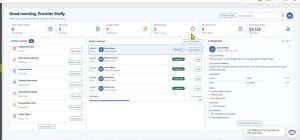
Once the clinician signs, billing can review the completed encounter on the daysheet, where the practice reviews services before releasing claims. The billing team can work from the service and encounter details already recorded. If something needs attention, such as a required countersignature or an authorization question, billing needs to know what’s holding up that encounter and who can resolve it.
That matters when several patients attend the same group. Most encounters may be straightforward, while one needs a closer look. When the reason is clear, billing can focus on that patient’s record and move the ready encounters forward.
Follow one IOP visit in your next EHR demo
Ask to see a group visit go from the schedule to the note to the billing review. Then change one detail. Have a patient leave early or make a supervisor’s signature pending. See what carries forward, what someone has to enter again, and how billing can tell which encounters are ready.
At DENmaar, this handoff is one reason we’re building the Provider Work Area around the work a clinician still needs to finish. A provider should be able to see what needs their attention, and billing should be able to act once that work is complete. The fewer times those two teams have to stop and ask each other what happened, the smoother the day goes for both.
This is part of a broader vision for an AI-enabled practice operating system that connects clinical, administrative, and financial workflows.
In your next DENmaar demo, bring a typical group visit from your program. We’ll walk it from the schedule through documentation and billing review.
Frequently asked questions
1. What is an IOP billing workflow?
An IOP billing workflow connects group scheduling, clinical documentation, encounter review, and claim preparation.
2. What happens after an IOP provider signs a note?
The completed encounter moves to billing review, where the team checks service details and outstanding requirements.
3. Why is attendance important in IOP billing?
Accurate attendance helps billing teams review the actual service delivered and identify encounters that need further attention.
4. How does an EHR support IOP group billing?
An EHR can carry scheduled service and configured billing details into documentation, reducing repeated data entry.
5. What should an IOP practice check during an EHR demo?
Follow a group visit from scheduling to documentation and billing review. Check how changes and pending signatures are handled.